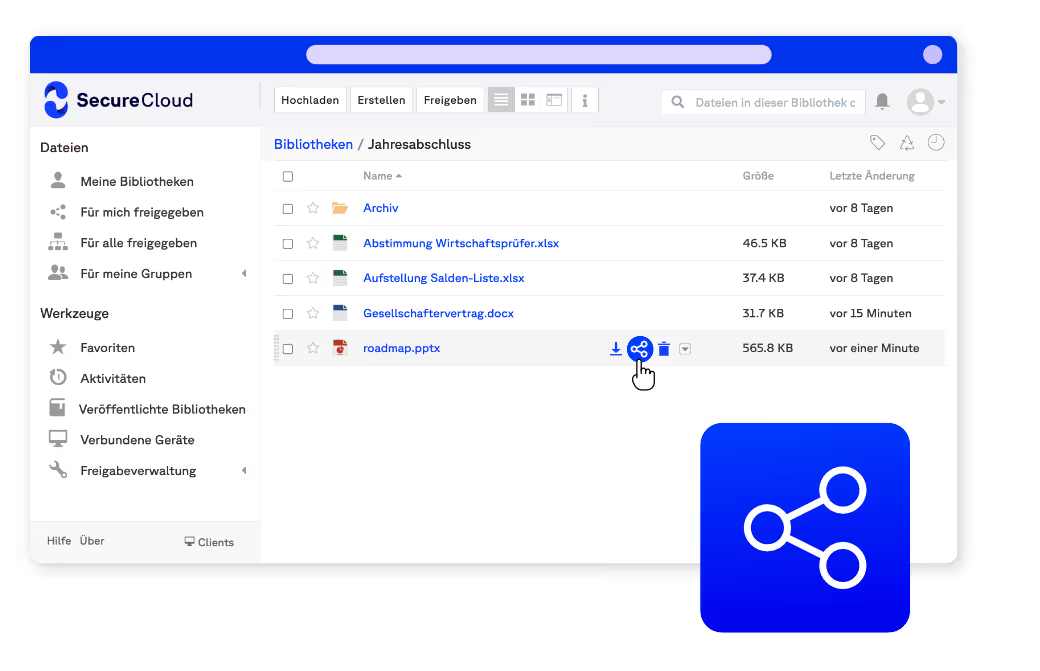
Secure Cloud Storage
for Businesses
The sovereign home for all your company data - including everything that shouldn't sit in a US cloud. Encrypted, versioned, hosted in Germany.
One secure place for all your data
right alongside your Office cloud

Bring scattered data together,
stored sovereignly in Germany
Many teams run Microsoft 365 for mail, meetings and Office - and in daily work, files quickly spread to other places: local drives, USB sticks or consumer services like Google Drive and Dropbox. That's understandable, but for sensitive company data it leaves no central, sovereign place under German jurisdiction.
SecureCloud fills exactly that gap: a central, encrypted cloud storage from Germany that runs seamlessly alongside Microsoft 365 - reachable from any device, with version history and granular permissions. Your data stays entirely within German infrastructure.
This is why SecureCloud as your cloud storage:four reasons that make the difference

Over 6,000 customers trust SecureCloud


.svg)


Cloud storage solutionscompared
Learn more!
Our experts are happy to answer all your questions.
Guided from day one
migration, setup and training included
Moving in?
We guide you
Whether from consumer clouds, another provider or your own file server - the move to SecureCloud is guided.
After kickoff we set up administration and structure, a free basic training gets your team on board, and a pilot group goes live before the rollout.
In most cases SecureCloud simply runs alongside Microsoft 365 - you only move the data that belongs somewhere more secure.
Our certificates


Cloud
Securely stored
in every industry
Data protection and control,
in every department
- IT departments: End shadow IT and store all data centrally, controlled and encrypted.
- Public sector & administration: Keep records in Germany, BSI C5- and GDPR-compliant.
- Healthcare: Store patient and case data securely and in legal compliance.
- Financial services: Store data in an audit-proof way and document every change without gaps.
- Legal & tax advisory: Manage client data confidentially and traceably.
- Manufacturing: Store construction and project data securely and share it with partners.
- ...and many more industries and sectors!

Frequently asked questions
Related terms
Data based in Germany
Data centers and company headquarters in Germany
Our promise: #nobackdoor